Skip to content

Product Design · 2026 · Aantoon

From a 27-chapter brief to a build-ready MVP in three weeks

Design system and core flows for an AI contract-compliance platform.

Product Design · Design System · UX Research · Figma · Untitled UI

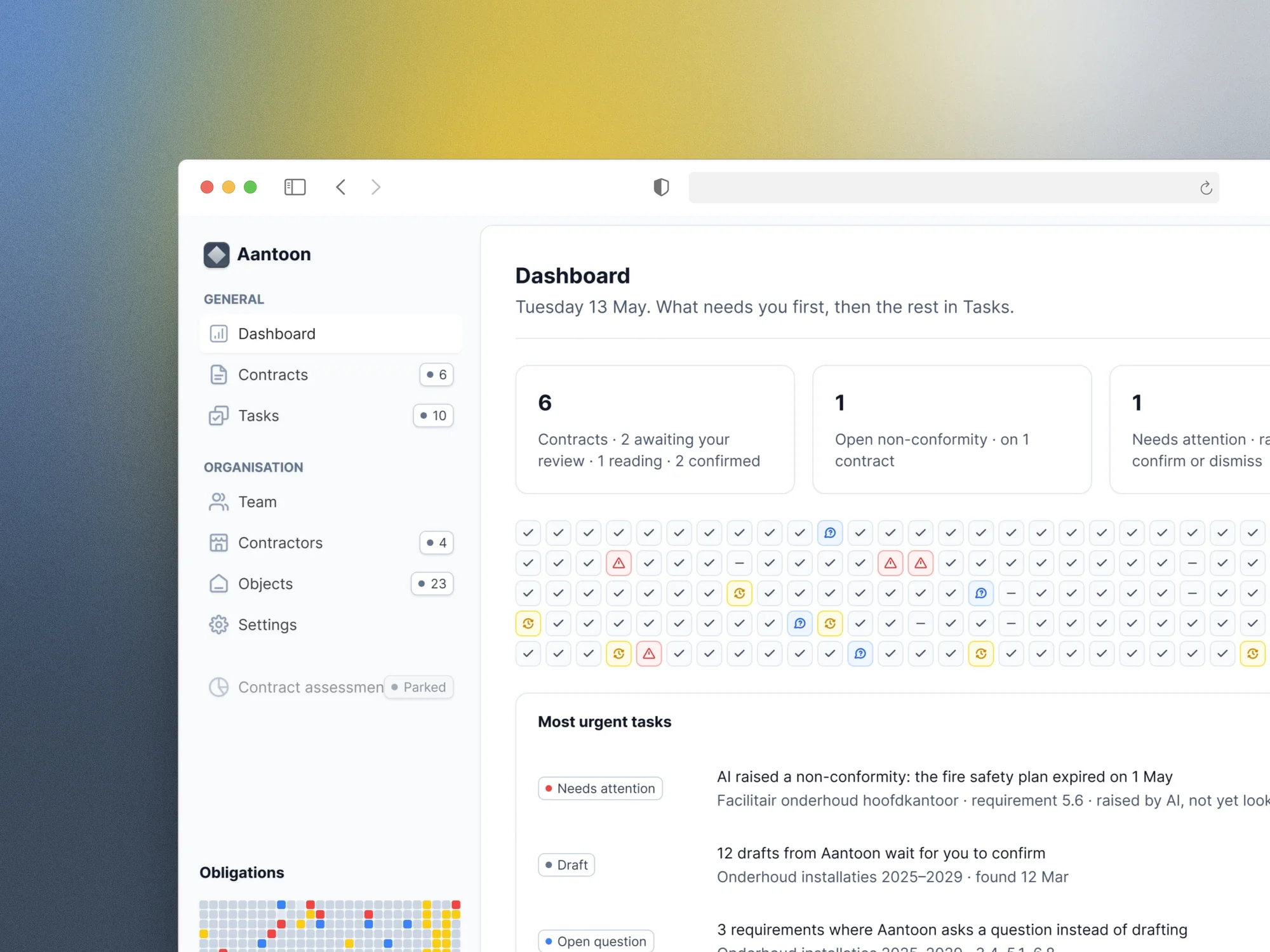
Aantoon dashboard, close up: a few counts of what needs attention, a grid of obligation statuses and the most urgent tasks
Dashboard, close up. What needs you first, then the rest in Tasks.
chapters in the brief
27
budget, capped on purpose
1 month
screens and a design system
About 29
a developer building from them
Week 3

Aantoon is a Dutch AI contract-compliance platform for the public sector. A dense domain. A 27-chapter brief. No visual identity. One month, and a developer due to start building in week 3.

Public-sector clients sign contracts full of obligations, and their maintenance suppliers have to prove they met them. Aantoon shows, for every obligation, whether it is met and where the evidence is. Three weeks in, the product owner had a complete design system and about 29 screens, and the developer was building from them.

The brief

The product owner came in for a one-month BTNG Design Subscription, budget capped on purpose. The brief held 2 to 3 months of work. I said so before the month started, and the product owner cut it to fit.

The product owner set the order on a shared board, one thing at a time, with a first version within 24 to 48 hours and one weekly call. The rule, agreed up front: what is at the top gets finished, what is at the bottom may not. Mobile, roles and permissions, user testing and a full clickable prototype were out of scope.

Getting to the core

Before I drew a screen, I wrote down the core of the product. Five concepts: contract, requirement, obligation, evidence and verdict. Three flows: read in, prove and overview. One AI rule: every AI step has a manual path.

“Obligation” appeared in none of the client’s documents. It ended up carrying the whole product.

I also studied existing contract-management tools. Everything not needed for v1 was parked with a version number.
Week 1

The design system

The design system sits on Untitled UI, with Aantoon’s own components on top. Typefaces, wording and colour run through tokens, so each changes in one place, as the product owner asked. Inter only, slate as neutral and brand colour, a few status colours, light mode. Two decisions carry the system.

The first is a status component you can read without colour. Status colours mark status, and only what needs action draws the eye.

The second is how AI shows up. Aantoon’s AI reads requirements from contracts and proposes verdicts on evidence. It only proposes: a person sees and moderates every decision. Hatched means an AI proposal, solid a human decision, and both carry a source line.

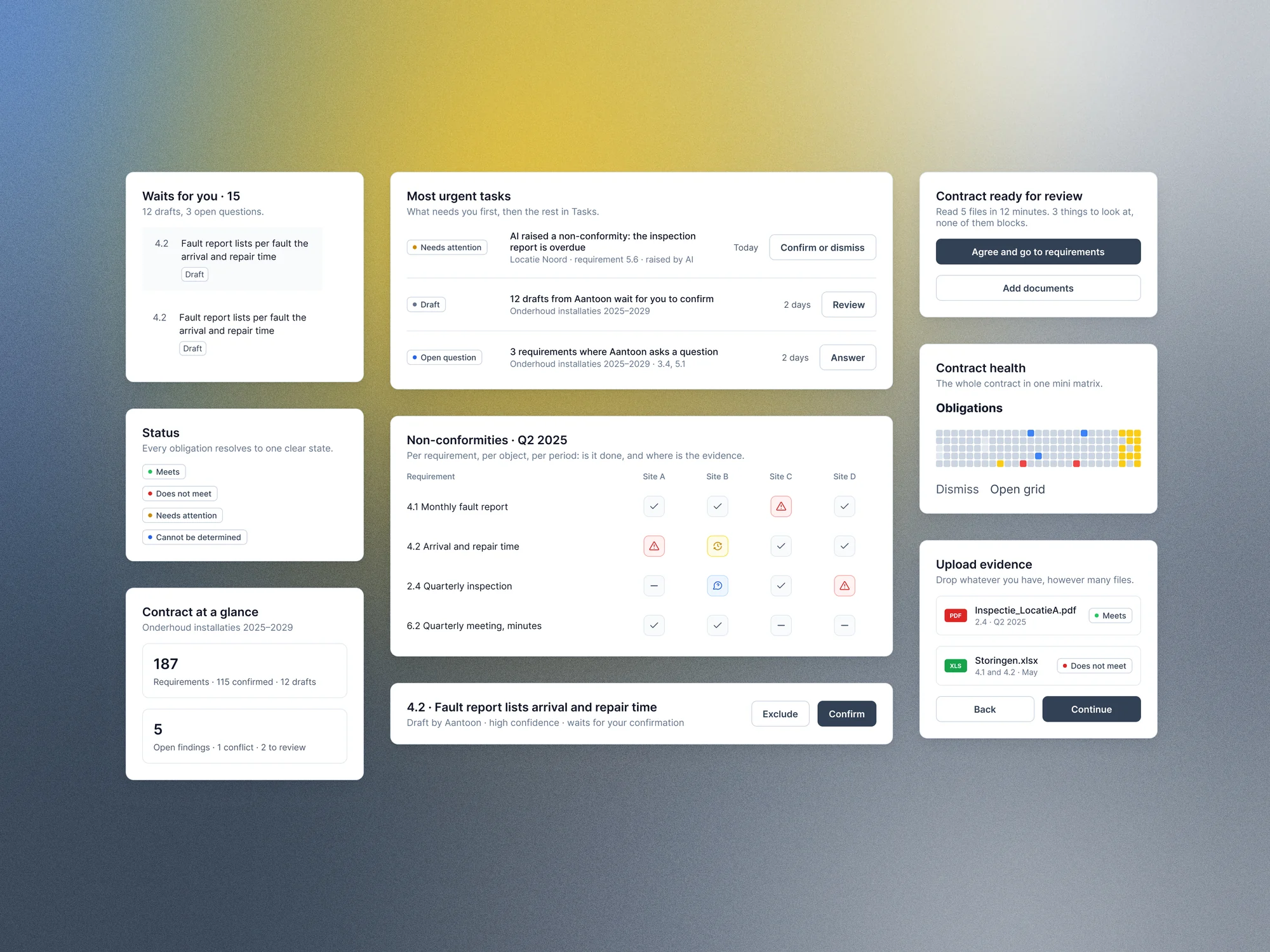
Aantoon components: task rows with a single action, status badges, the obligations matrix, an evidence upload and an AI draft waiting to be confirmed
Components. Task rows with one action, status badges, the matrix, evidence upload and an AI draft to confirm.

Week 2

Read in

Week 2 covered how a contract gets into Aantoon.

Clickable wireframes before Figma

Claude built the wireframes as grey, clickable HTML. I set what went in. A switch showed the client’s view or the contractor’s, and every screen had a note ending in open questions for the weekly call. Nine versions in about three weeks, then I rebuilt the screens in Figma myself. HTML wireframes are the fastest way to show and tell, and iterate.

Creating a contract

One screen, three groups

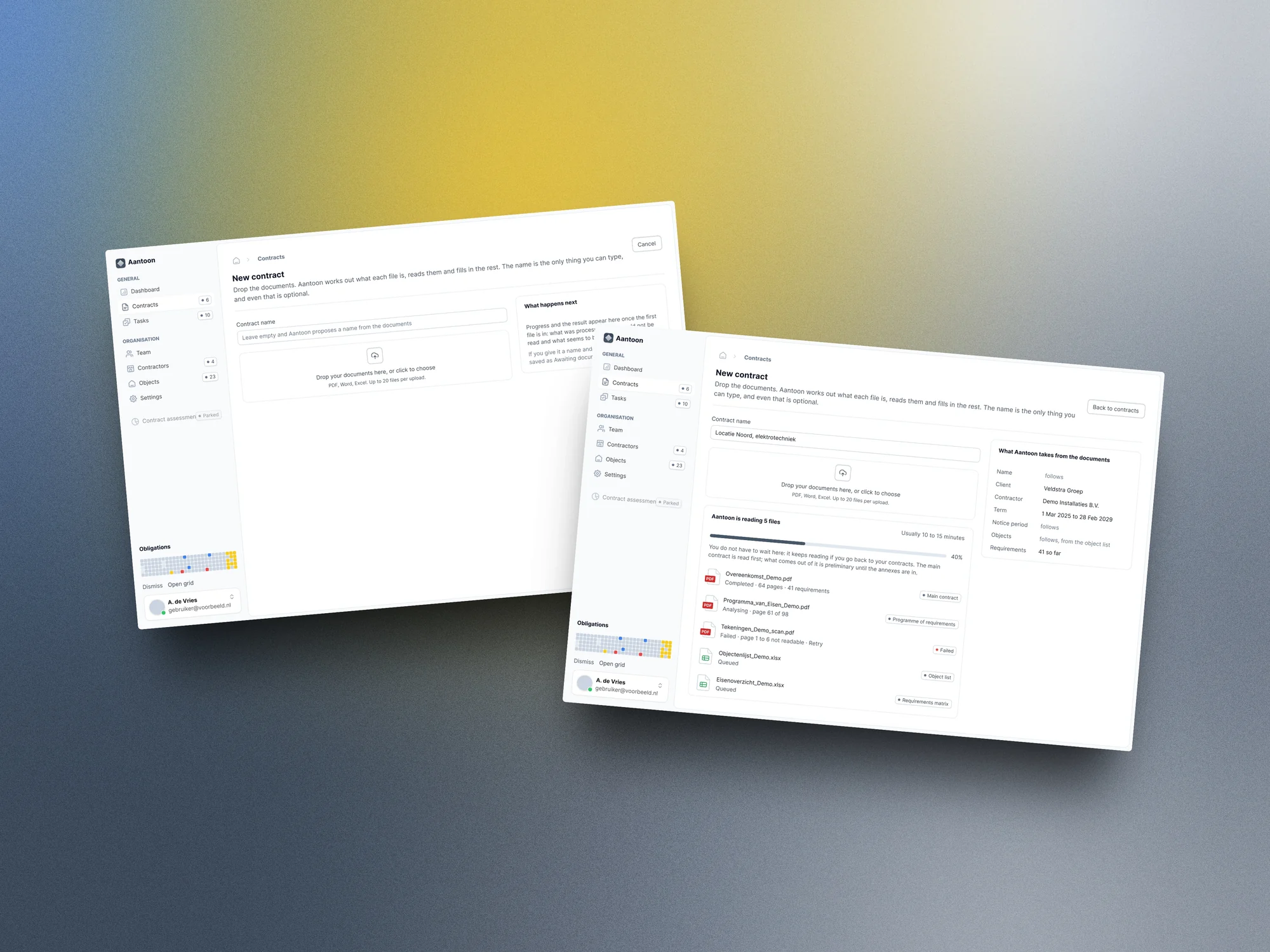
Create contract screen: contract files read one by one, an unreadable scan flagged, and the contract details filled in
Create contract. Read file by file, an unreadable scan flagged, the contract details filled in.

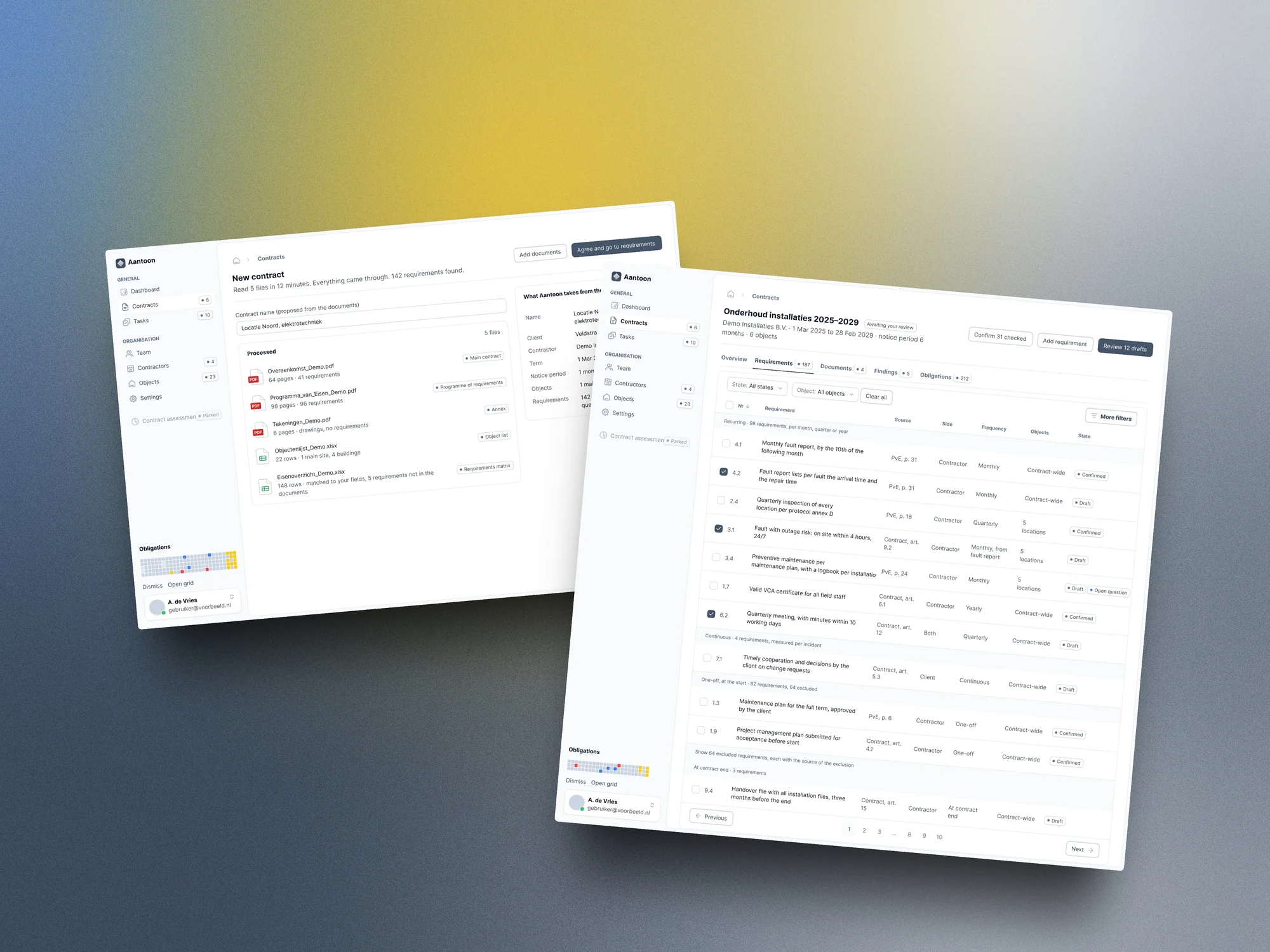
Upload, reading and checking started as separate steps. After the product owner answered 9 open points in writing, “New contract” became one screen, with the results grouped as processed, unreadable and possibly missing. Every requirement then goes into a register.

Result of reading a contract: five files processed, followed by the requirements register listing every requirement with its source and state
Result and register. Five files read, then every requirement with its source and state.

Requirement review, side by side

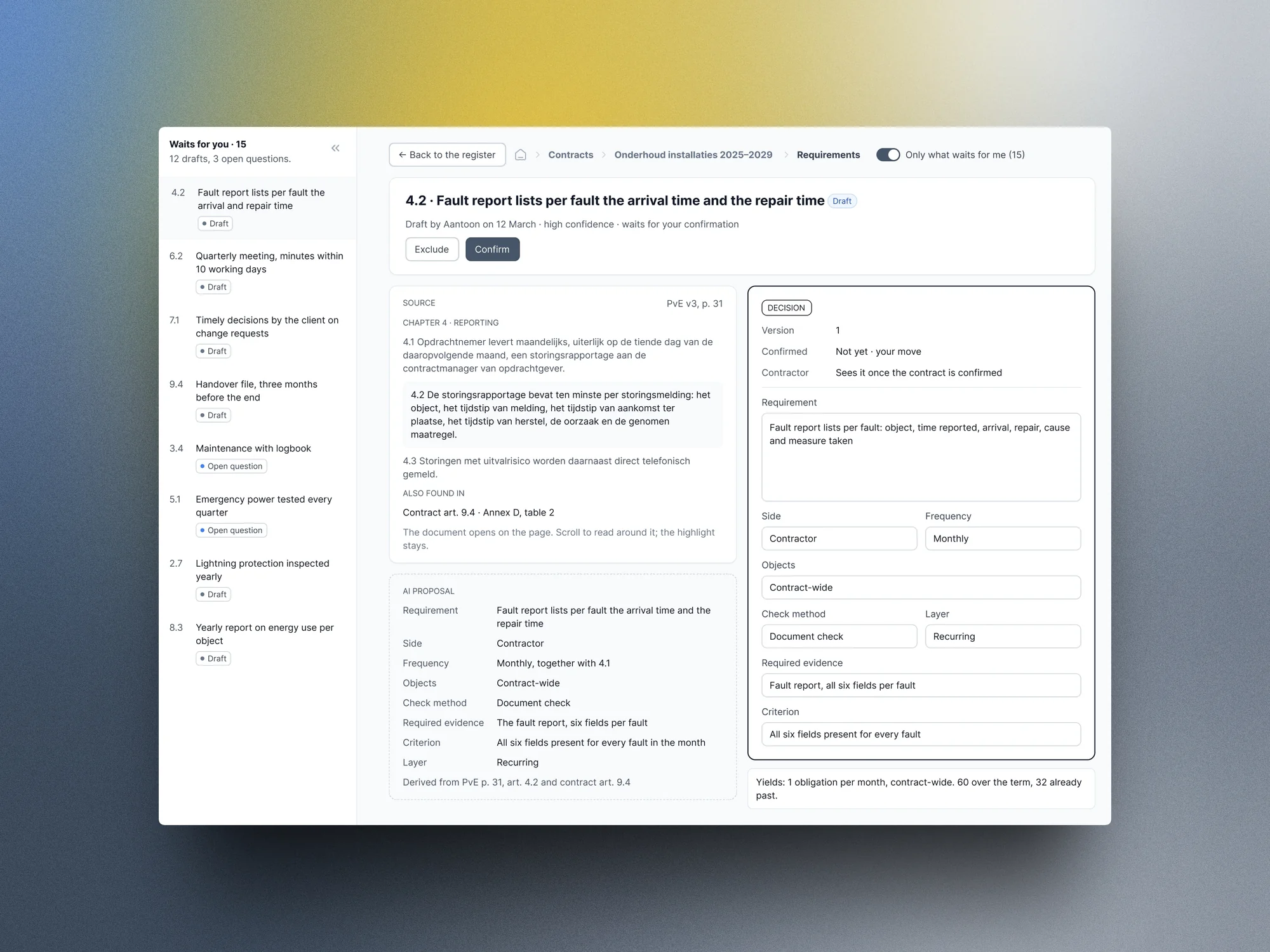
A requirement opens with the contract text, the AI proposal and the editable final requirement side by side.

Requirement review: the source contract text, the AI proposal and the editable final requirement in three columns
Requirement review. The source text, the AI proposal and the editable decision side by side.

Week 3

Prove

Evidence, proposal, decision

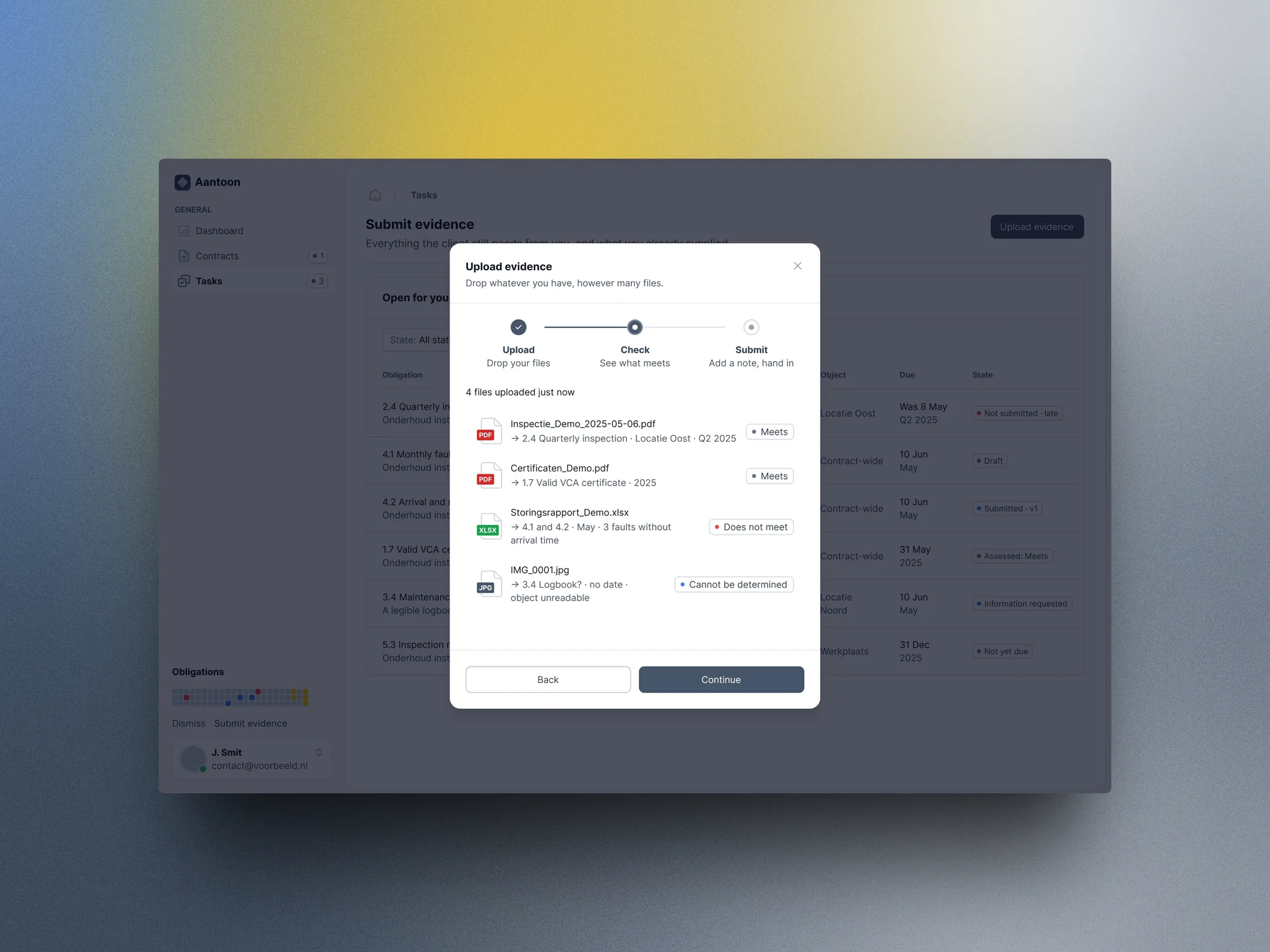
Week 3 included a five-hour working session in person. It produced the obligation panel: evidence, AI proposal, human decision and history. The contractor gets a task list and an evidence submission with a document check.

Submit evidence: four uploaded files checked per obligation as meets, does not meet or cannot be determined
Submit evidence. Four files, checked per obligation: meets, does not meet, cannot be determined.
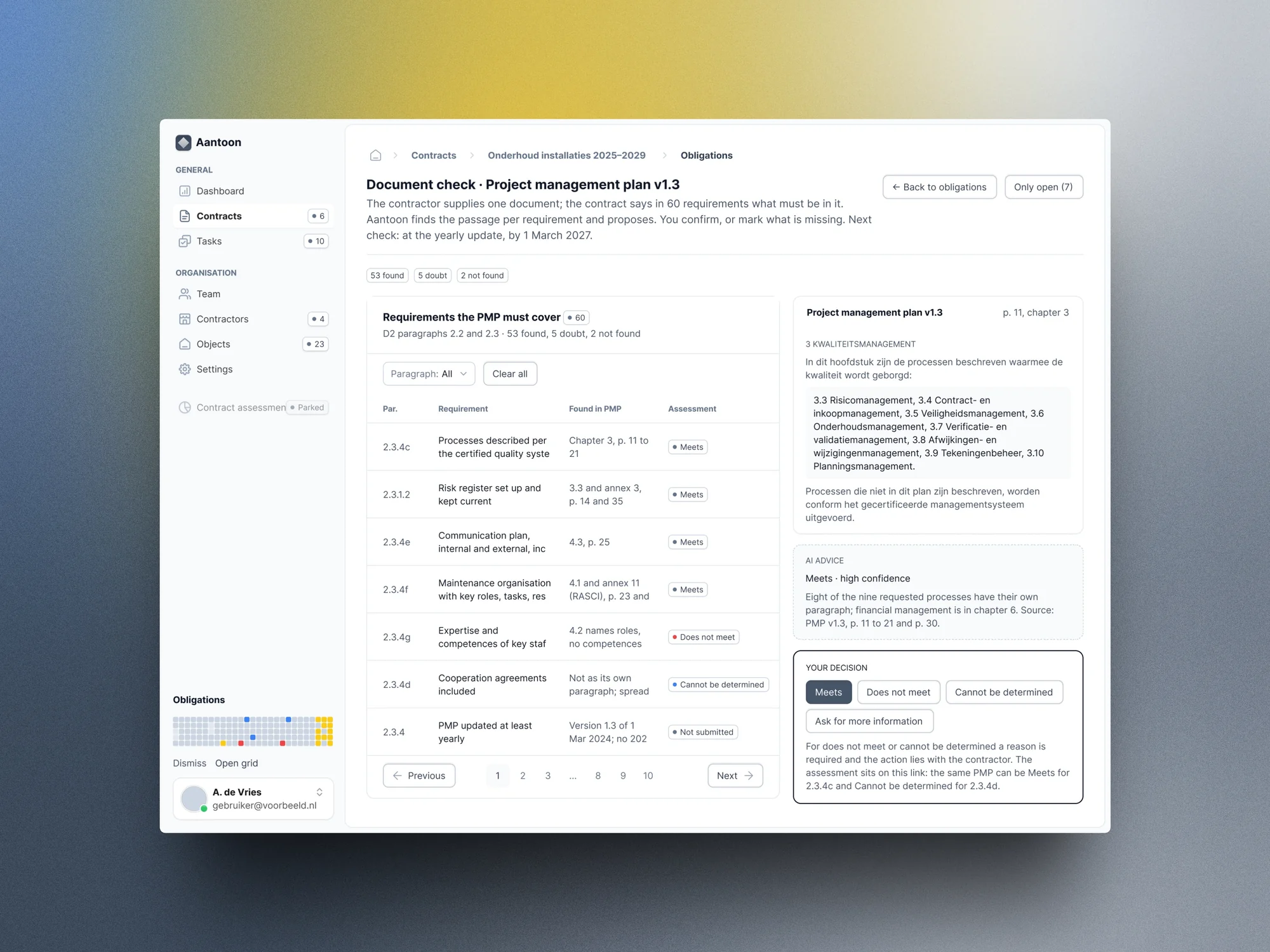
Document check: one plan checked against every requirement it must cover, with the matching passage, the AI advice and the decision
Document check. One plan against every requirement it must cover: passage, AI advice, decision.

The matrix

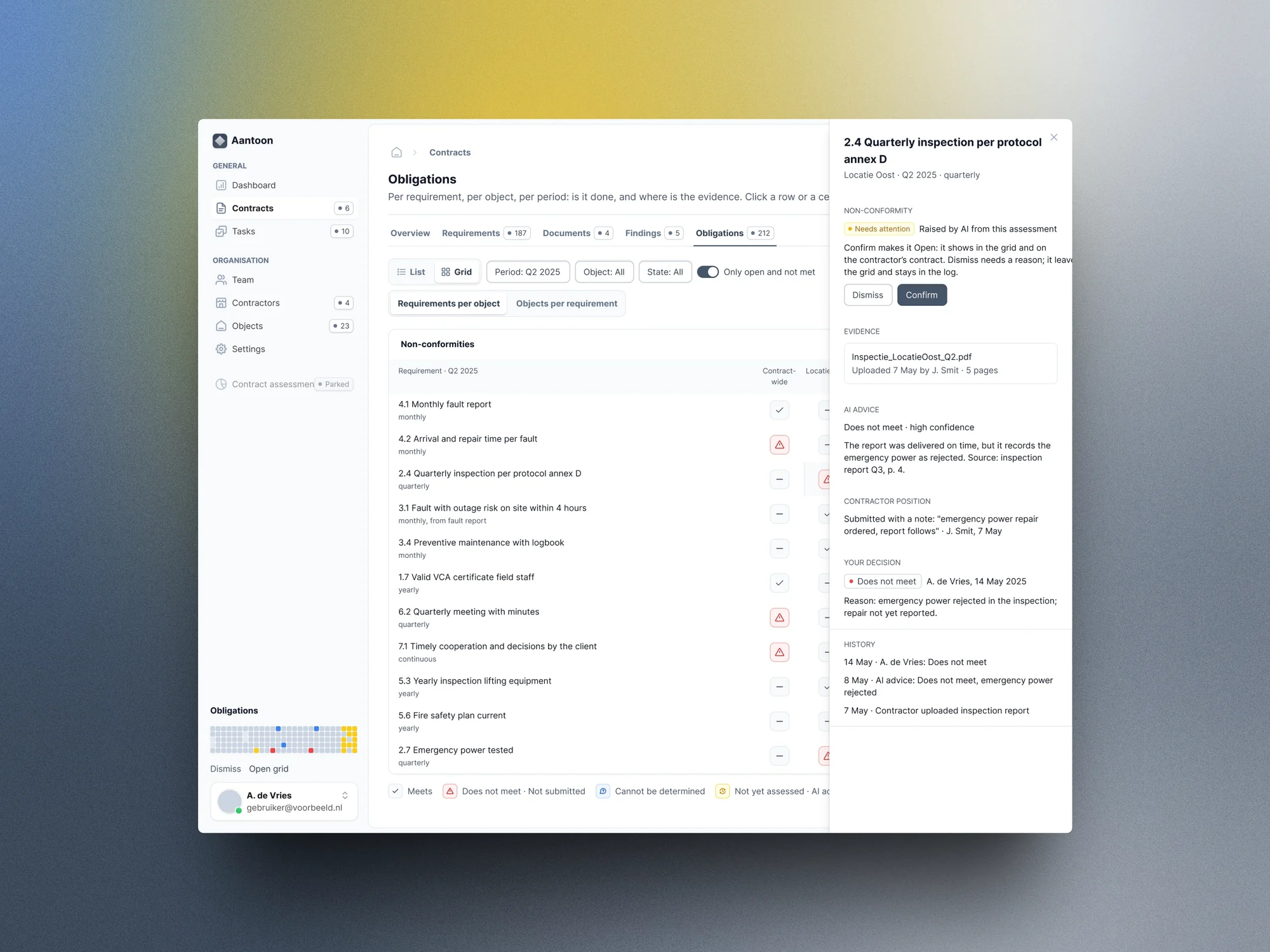
Obligations show as a list or as a matrix. The matrix shows a whole contract at once.

Obligations grid: requirements per object per quarter, mostly grey with a few coloured cells, and the obligation panel open on the right
Obligations grid. Requirements per object per quarter, with the obligation panel open.

The handover

The developer started building from the designs in week 3, and in week 4 the product owner made the screens leading for the MVP.

The handover came a week before the end of the month: one English HTML document with the v1 scope, every screen linked to Figma, the rules, the design system and the open points. Next to it sit a dated decision log and a product dictionary in English and Dutch, because the product is built in two languages. Then my scope paused, as planned.

How AI helped me get there

The client shared a real, confidential maintenance contract. I used AI to read it against my model and find where the model was wrong. The document check, for example, became its own screen. The contract is not shown here, and every contract, object and supplier on screen is invented.

An AI note-taker recorded the calls. The dated decision log, not the recordings, is the source of truth.

Claude built the wireframes. I held the first set against my core, and it failed in five places. The dashboard had a percentage score that hides problems, and the menu showed screens that did not exist yet. I fixed those before the client saw the next version.

When the client sent a long reply, I first put it to five independent Claude agents: one on architecture, a skeptic, a pragmatist, a contract manager and a UX designer. They agreed the domain logic was sound and the status model too big. I took ten of their changes and sent back the nine questions the product owner answered in writing.

On the day of the working session, Claude grilled me one question at a time until every open point had a decision, with core first as the rule.

The same rule as in the product: AI proposed, and I saw and moderated every decision.

What this shows

The domain got the first days of the month. Five concepts, three flows and one AI rule came before any screen, and every screen traces back to them.

That is why a single developer could start in week 3. The capped scope helped too: the product owner chose what came first, and everything else has a version number.

“Within a few days, Philip had immersed himself so deeply in our domain that it felt like he’d been working in it for years. It was almost scary how quickly he grasped the content and turned it into a strong design. That helped us enormously: within three weeks we had a complete set of designs for our MVP. Impressive how he combines speed, subject-matter understanding and quality.”
Jeroen van de Pol Productowner
“The result is beautiful, I’m so happy with it.”
Jeroen van de Pol Productowner, by email after the handover

Building a B2B product in a complex domain, with a developer waiting for screens?

Book a call

Back to cases